
| 일 | 월 | 화 | 수 | 목 | 금 | 토 |
|---|---|---|---|---|---|---|
| 1 | 2 | 3 | 4 | 5 | 6 | |
| 7 | 8 | 9 | 10 | 11 | 12 | 13 |
| 14 | 15 | 16 | 17 | 18 | 19 | 20 |
| 21 | 22 | 23 | 24 | 25 | 26 | 27 |
| 28 | 29 | 30 |
- 코드카타
- 스프링
- Spring Batch
- redis
- 템플릿 메서드 패턴
- 트러블슈팅
- 스프링 배치
- 프록시 패턴
- Effective Java
- 배치
- 계산기
- 토스
- 자바
- 빌더 패턴
- GoF 23
- 추상클래스
- 스케줄러
- 이펙티브 자바
- 성능 개선
- spring boot
- 디자인 패턴
- 김영한
- Spring
- DB
- java
- Til
- 백엔드
- 로드밸런서
- lv1
- 프로그래머스
- Today
- Total
김코딩
빌더 패턴(Builder Pattern) 본문
디자인 패턴 시리즈의 네 번째 주제는 빌더 패턴(Builder Pattern)이다.
지금까지 본 패턴들이 "어떤 객체를 만들까?"에 집중했다면, 빌더 패턴은 "복잡한 객체를 어떻게 만들까?"에 대한 해답이다.
예를 들어, 피자를 주문한다고 생각해보자. 도우 종류, 소스, 토핑, 치즈 종류, 사이즈 등 선택할 게 정말 많다.
생성자로 이 모든 걸 받으면 new Pizza(도우, 소스, 토핑1, 토핑2, 토핑3, 치즈, 사이즈, 굽기정도, 엣지)처럼 엄청 길어진다.
빌더 패턴은 이런 복잡한 객체를 단계별로 만들 수 있게 해준다.
이번 글에서는 빌더 패턴이 무엇인지, 왜 필요한지, 어떻게 구현하는지 알아보자.
빌더 패턴의 정의
빌더 패턴(Builder Pattern)은 복잡한 객체의 생성 과정과 표현 방법을 분리하여, 동일한 생성 절차에서 서로 다른 표현 결과를 만들 수 있게 하는 패턴이다.
핵심 특징:
- 복잡한 객체를 단계별로 생성한다
- 생성 과정을 메서드 체이닝으로 연결한다
- 필수 값과 선택 값을 명확하게 구분한다
- 불변 객체(Immutable Object) 생성에 적합하다
왜 빌더 패턴이 필요할까?
피자 주문 시스템을 개발한다고 가정해보자.
방법 1: 점층적 생성자 패턴 (문제가 많음)
public class Pizza {
    private String dough;      // 필수
    private String sauce;      // 필수
    private String cheese;     // 선택
    private String pepperoni;  // 선택
    private String mushroom;   // 선택
    private String onion;      // 선택

    // 생성자가 너무 많아진다
    public Pizza(String dough, String sauce) {
        this(dough, sauce, null);
    }

    public Pizza(String dough, String sauce, String cheese) {
        this(dough, sauce, cheese, null);
    }

    public Pizza(String dough, String sauce, String cheese, String pepperoni) {
        this(dough, sauce, cheese, pepperoni, null);
    }

    public Pizza(String dough, String sauce, String cheese, String pepperoni, String mushroom) {
        this(dough, sauce, cheese, pepperoni, mushroom, null);
    }

    public Pizza(String dough, String sauce, String cheese, String pepperoni, String mushroom, String onion) {
        this.dough = dough;
        this.sauce = sauce;
        this.cheese = cheese;
        this.pepperoni = pepperoni;
        this.mushroom = mushroom;
        this.onion = onion;
    }
}

// 사용할 때
Pizza pizza = new Pizza("씬", "토마토", "모짜렐라", null, "양송이", null);
// 문제: null이 뭘 의미하는지 알 수 없음!
문제점:
- 생성자가 너무 많아진다
- 매개변수 순서를 외워야 한다
- null이 무엇을 의미하는지 알 수 없다
- 실수하기 쉽다
방법 2: 자바빈즈 패턴 (문제가 있음)
public class Pizza {
    private String dough;
    private String sauce;
    private String cheese;
    private String pepperoni;
    private String mushroom;
    private String onion;

    // Setter 메서드들
    public void setDough(String dough) { this.dough = dough; }
    public void setSauce(String sauce) { this.sauce = sauce; }
    public void setCheese(String cheese) { this.cheese = cheese; }
    public void setPepperoni(String pepperoni) { this.pepperoni = pepperoni; }
    public void setMushroom(String mushroom) { this.mushroom = mushroom; }
    public void setOnion(String onion) { this.onion = onion; }
}

// 사용할 때
Pizza pizza = new Pizza();
pizza.setDough("씬");
pizza.setSauce("토마토");
pizza.setCheese("모짜렐라");
pizza.setMushroom("양송이");
문제점:
- 객체가 완전히 생성되기 전까지 일관성이 깨진다
- 불변 객체를 만들 수 없다 (setter가 있으니까)
- 스레드 안전하지 않다
빌더 패턴은 이 모든 문제를 해결한다!
순수 Java로 구현하기
기본 빌더 패턴
public class Pizza {
    // 필수 매개변수
    private final String dough;
    private final String sauce;

    // 선택 매개변수
    private final String cheese;
    private final String pepperoni;
    private final String mushroom;
    private final String onion;

    // private 생성자 - 직접 생성 불가
    private Pizza(Builder builder) {
        this.dough = builder.dough;
        this.sauce = builder.sauce;
        this.cheese = builder.cheese;
        this.pepperoni = builder.pepperoni;
        this.mushroom = builder.mushroom;
        this.onion = builder.onion;
    }

    // Builder 클래스 (내부 정적 클래스)
    public static class Builder {
        // 필수 매개변수
        private final String dough;
        private final String sauce;

        // 선택 매개변수 - 기본값으로 초기화
        private String cheese = "";
        private String pepperoni = "";
        private String mushroom = "";
        private String onion = "";

        // 필수 매개변수는 생성자로 받음
        public Builder(String dough, String sauce) {
            this.dough = dough;
            this.sauce = sauce;
        }

        // 선택 매개변수는 메서드로 설정 (메서드 체이닝)
        public Builder cheese(String cheese) {
            this.cheese = cheese;
            return this;
        }

        public Builder pepperoni(String pepperoni) {
            this.pepperoni = pepperoni;
            return this;
        }

        public Builder mushroom(String mushroom) {
            this.mushroom = mushroom;
            return this;
        }

        public Builder onion(String onion) {
            this.onion = onion;
            return this;
        }

        // 최종적으로 Pizza 객체 생성
        public Pizza build() {
            return new Pizza(this);
        }
    }

    @Override
    public String toString() {
        return "Pizza{" +
                "도우='" + dough + '\'' +
                ", 소스='" + sauce + '\'' +
                ", 치즈='" + cheese + '\'' +
                ", 페퍼로니='" + pepperoni + '\'' +
                ", 양송이='" + mushroom + '\'' +
                ", 양파='" + onion + '\'' +
                '}';
    }
}

// 사용 예시
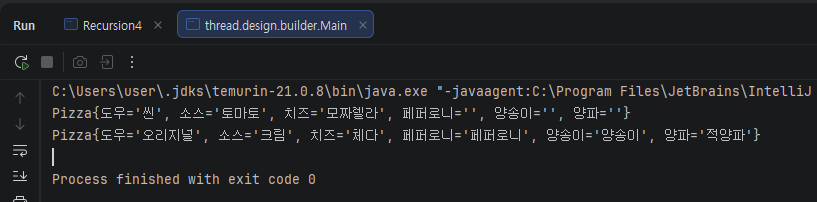
public class Main {
    public static void main(String[] args) {
        // 간단한 피자
        Pizza pizza1 = new Pizza.Builder("씬", "토마토")
                .cheese("모짜렐라")
                .build();

        System.out.println(pizza1);

        // 토핑 많은 피자
        Pizza pizza2 = new Pizza.Builder("오리지널", "크림")
                .cheese("체다")
                .pepperoni("페퍼로니")
                .mushroom("양송이")
                .onion("적양파")
                .build();

        System.out.println(pizza2);
    }
}
장점:
- 코드가 읽기 쉽다 (무엇을 설정하는지 명확)
- 원하는 옵션만 선택할 수 있다
- 불변 객체가 생성된다
- 매개변수 순서를 신경 쓸 필요 없다
실전 예제: 회원가입 폼
더 실무적인 예시를 보자.
public class User {
    // 필수
    private final String email;
    private final String password;
    private final String name;

    // 선택
    private final String nickname;
    private final int age;
    private final String phone;
    private final String address;
    private final boolean marketingAgree;

    private User(Builder builder) {
        this.email = builder.email;
        this.password = builder.password;
        this.name = builder.name;
        this.nickname = builder.nickname;
        this.age = builder.age;
        this.phone = builder.phone;
        this.address = builder.address;
        this.marketingAgree = builder.marketingAgree;
    }

    public static class Builder {
        // 필수
        private final String email;
        private final String password;
        private final String name;

        // 선택
        private String nickname = "";
        private int age = 0;
        private String phone = "";
        private String address = "";
        private boolean marketingAgree = false;

        public Builder(String email, String password, String name) {
            this.email = email;
            this.password = password;
            this.name = name;
        }

        public Builder nickname(String nickname) {
            this.nickname = nickname;
            return this;
        }

        public Builder age(int age) {
            this.age = age;
            return this;
        }

        public Builder phone(String phone) {
            this.phone = phone;
            return this;
        }

        public Builder address(String address) {
            this.address = address;
            return this;
        }

        public Builder marketingAgree(boolean agree) {
            this.marketingAgree = agree;
            return this;
        }

        public User build() {
            // 유효성 검증도 여기서 가능
            if (email == null || email.isEmpty()) {
                throw new IllegalArgumentException("이메일은 필수입니다");
            }
            if (password.length() < 8) {
                throw new IllegalArgumentException("비밀번호는 8자 이상이어야 합니다");
            }
            return new User(this);
        }
    }

    @Override
    public String toString() {
        return "User{" +
                "email='" + email + '\'' +
                ", name='" + name + '\'' +
                ", nickname='" + nickname + '\'' +
                ", age=" + age +
                ", phone='" + phone + '\'' +
                ", address='" + address + '\'' +
                ", marketingAgree=" + marketingAgree +
                '}';
    }
}

// 사용
public class Main {
    public static void main(String[] args) {
        // 최소 정보만 입력
        User user1 = new User.Builder("kim@email.com", "password123", "김도균")
                .build();

        System.out.println(user1);

        // 모든 정보 입력
        User user2 = new User.Builder("lee@email.com", "password456", "이철수")
                .nickname("철수")
                .age(25)
                .phone("010-1234-5678")
                .address("서울시 강남구")
                .marketingAgree(true)
                .build();

        System.out.println(user2);
    }
}
Lombok을 사용한 간편한 빌더
실무에서는 Lombok의 @Builder 어노테이션을 많이 사용한다.
import lombok.Builder;
import lombok.ToString;

@Builder
@ToString
public class Coffee {
    private String size;        // 사이즈
    private String type;        // 종류
    private boolean iceOrHot;   // 아이스/핫
    private int shot;           // 샷 개수
    private boolean whipping;   // 휘핑크림
    private boolean syrup;      // 시럽
}

// 사용
public class Main {
    public static void main(String[] args) {
        Coffee coffee = Coffee.builder()
                .size("Tall")
                .type("아메리카노")
                .iceOrHot(true)
                .shot(2)
                .build();

        System.out.println(coffee);
    }
}
엄청 간단해진다! 하지만 필수 값 검증 같은 커스텀 로직이 필요하면 직접 구현하는 게 낫다.
빌더 패턴의 장점
- 가독성: 코드가 읽기 쉽고 명확하다
- 유연성: 필요한 값만 설정할 수 있다
- 불변성: 불변 객체를 쉽게 만들 수 있다
- 안전성: 잘못된 객체 생성을 방지할 수 있다
- 확장성: 새로운 옵션 추가가 쉽다
빌더 패턴의 단점
- 코드량 증가: Builder 클래스를 추가로 작성해야 함
- 성능: 객체를 하나 더 만들어야 함 (큰 문제는 아님)
- 단순한 객체: 매개변수가 4개 이하면 오히려 복잡할 수 있음
Spring에서의 빌더 패턴
Spring에서도 빌더 패턴을 자주 사용한다.
// DTO에 빌더 사용
@Builder
public class UserCreateRequest {
    private String email;
    private String password;
    private String name;
    private String nickname;
}

// 엔티티에 빌더 사용
@Entity
@Builder
public class Post {
    @Id
    @GeneratedValue(strategy = GenerationType.IDENTITY)
    private Long id;

    private String title;
    private String content;
    private String author;
}

// 서비스에서 사용
@Service
public class PostService {
    public Post createPost(PostCreateRequest request) {
        return Post.builder()
                .title(request.getTitle())
                .content(request.getContent())
                .author(request.getAuthor())
                .build();
    }
}
실무에서 언제 사용할까?
사용하면 좋은 경우:
- 매개변수가 많을 때 (4개 이상)
- 선택적 매개변수가 많을 때
- 불변 객체를 만들어야 할 때
- 객체 생성 과정이 복잡할 때
- 유효성 검증이 필요할 때
사용하지 않아도 되는 경우:
- 매개변수가 적을 때 (2-3개)
- 모든 매개변수가 필수일 때
- 객체가 자주 변경될 때 (가변 객체)
핵심 원칙:
"복잡한 객체를 만들 땐 빌더를, 간단한 객체는 생성자를 사용하라"
생성자 vs 빌더 비교
// 생성자 방식 - 간단할 때
Point point = new Point(10, 20);

// 빌더 방식 - 복잡할 때
Pizza pizza = new Pizza.Builder("씬", "토마토")
        .cheese("모짜렐라")
        .pepperoni("페퍼로니")
        .mushroom("양송이")
        .build();
결론
빌더 패턴은 복잡한 객체를 가독성 좋게 생성하는 강력한 패턴이다.
기억해야 할 포인트:
- 메서드 체이닝으로 가독성이 높아진다
- 필수 값과 선택 값을 명확히 구분한다
- 불변 객체 생성에 최적이다
- Lombok의 @Builder로 간편하게 사용 가능하다
- 매개변수가 많거나 복잡할 때만 사용한다
다음 글에서는 기존 객체를 복사해서 새로운 객체를 만드는 프로토타입 패턴을 알아볼 것이다.
다음 글 예고: 프로토타입 패턴 - 객체를 복사해서 새로 만들어라
'디자인 패턴' 카테고리의 다른 글
| 어댑터 패턴(Adapter Pattern) (0) | 2026.01.13 |
|---|---|
| 프로토타입 패턴(Prototype Pattern) (0) | 2026.01.13 |
| 추상 팩토리 패턴(Abstract Factory Pattern) (0) | 2026.01.13 |
| 팩토리 메서드 패턴(Factory Method Pattern) (0) | 2026.01.13 |
| 싱글톤 패턴(Singleton Pattern) (0) | 2026.01.13 |


