
| 일 | 월 | 화 | 수 | 목 | 금 | 토 |
|---|---|---|---|---|---|---|
| 1 | 2 | 3 | 4 | 5 | 6 | |
| 7 | 8 | 9 | 10 | 11 | 12 | 13 |
| 14 | 15 | 16 | 17 | 18 | 19 | 20 |
| 21 | 22 | 23 | 24 | 25 | 26 | 27 |
| 28 | 29 | 30 |
- Til
- 스케줄러
- 배치
- DB
- 프로그래머스
- 빌더 패턴
- 김영한
- 이펙티브 자바
- 디자인 패턴
- 코드카타
- 계산기
- 트러블슈팅
- 스프링
- Effective Java
- java
- 토스
- lv1
- 템플릿 메서드 패턴
- 백엔드
- 추상클래스
- 자바
- 로드밸런서
- 스프링 배치
- Spring Batch
- GoF 23
- redis
- 성능 개선
- Spring
- 프록시 패턴
- spring boot
- Today
- Total
김코딩
프로토타입 패턴(Prototype Pattern) 본문
디자인 패턴 시리즈의 다섯 번째 주제는 프로토타입 패턴(Prototype Pattern)이다.
지금까지 본 생성 패턴들이 "객체를 어떻게 새로 만들까?"에 집중했다면, 프로토타입 패턴은 "기존 객체를 복사해서 만들자"는 해답이다.
예를 들어, 게임에서 몬스터를 만든다고 생각해보자. 슬라임 몬스터의 체력, 공격력, 방어력, 스킬 등을 하나하나 설정해서 만들었다. 이제 똑같은 슬라임을 100마리 더 만들어야 한다면? 처음부터 다시 설정하는 것보다 기존 슬라임을 복사하는 게 훨씬 빠르다.
프로토타입 패턴은 이런 "복사"를 다루는 패턴이다.
이번 글에서는 프로토타입 패턴이 무엇인지, 왜 필요한지, 어떻게 구현하는지 알아보자.
프로토타입 패턴의 정의
프로토타입 패턴(Prototype Pattern)은 원본 객체를 복제하여 새로운 객체를 생성하는 패턴이다. 객체를 처음부터 생성하는 대신, 기존 객체를 복사해서 필요한 부분만 수정한다.
핵심 특징:
- 기존 객체를 복사(Clone)하여 새 객체를 만든다
- 객체 생성 비용이 클 때 성능을 개선한다
- 원형(Prototype)이 되는 객체를 정의한다
- 복잡한 객체를 쉽게 복제할 수 있다
왜 프로토타입 패턴이 필요할까?
게임 캐릭터 생성 시스템을 개발한다고 가정해보자.
// 문제가 있는 코드
public class Character {
    private String name;
    private int level;
    private int health;
    private int attack;
    private int defense;
    private List<String> skills;
    private Equipment weapon;
    private Equipment armor;

    // 생성자로 모든 걸 설정
    public Character(String name, int level, int health, int attack,
                     int defense, List<String> skills, Equipment weapon, Equipment armor) {
        this.name = name;
        this.level = level;
        this.health = health;
        this.attack = attack;
        this.defense = defense;
        this.skills = skills;
        this.weapon = weapon;
        this.armor = armor;
    }
}

// 사용할 때
List<String> skills = Arrays.asList("파이어볼", "아이스볼트");
Equipment sword = new Equipment("검", 50);
Equipment plateArmor = new Equipment("판금갑옷", 100);

// 똑같은 전사를 10명 만들어야 한다면?
Character warrior1 = new Character("전사1", 10, 1000, 150, 100, skills, sword, plateArmor);
Character warrior2 = new Character("전사2", 10, 1000, 150, 100, skills, sword, plateArmor);
Character warrior3 = new Character("전사3", 10, 1000, 150, 100, skills, sword, plateArmor);
문제점:
- 똑같은 설정을 계속 반복해야 한다
- 객체 생성이 복잡하고 시간이 오래 걸린다
- 실수하기 쉽다 (하나 빼먹거나 잘못 입력)
- 코드 중복이 심하다
프로토타입 패턴은 "원본을 복사해서 빠르게 만들자"로 이 문제를 해결한다.
순수 Java로 구현하기
기본 프로토타입 패턴 (Cloneable 사용)
Java에서는 Cloneable 인터페이스와 clone() 메서드를 제공한다.
public class Monster implements Cloneable {
    private String name;
    private int health;
    private int attack;
    private int defense;

    public Monster(String name, int health, int attack, int defense) {
        this.name = name;
        this.health = health;
        this.attack = attack;
        this.defense = defense;
        System.out.println(name + " 생성됨 (복잡한 초기화 작업...)");
    }

    // 복제 메서드
    @Override
    public Monster clone() {
        try {
            return (Monster) super.clone();
        } catch (CloneNotSupportedException e) {
            throw new RuntimeException("복제 실패", e);
        }
    }

    public void setName(String name) {
        this.name = name;
    }

    @Override
    public String toString() {
        return "Monster{" +
                "name='" + name + '\'' +
                ", health=" + health +
                ", attack=" + attack +
                ", defense=" + defense +
                '}';
    }
}

// 사용 예시
public class Main {
    public static void main(String[] args) {
        // 원본 슬라임 생성 (시간이 오래 걸림)
        Monster originalSlime = new Monster("슬라임", 100, 10, 5);
        System.out.println("원본: " + originalSlime);

        System.out.println("\n--- 복제 시작 ---\n");

        // 복제로 빠르게 생성
        Monster slime1 = originalSlime.clone();
        slime1.setName("슬라임1");

        Monster slime2 = originalSlime.clone();
        slime2.setName("슬라임2");

        Monster slime3 = originalSlime.clone();
        slime3.setName("슬라임3");

        System.out.println("복제1: " + slime1);
        System.out.println("복제2: " + slime2);
        System.out.println("복제3: " + slime3);
    }
}
장점:
- 원본은 한 번만 생성 (복잡한 초기화 1회)
- 복제는 빠르게 진행
- 동일한 설정을 가진 객체를 쉽게 생성
얕은 복사 vs 깊은 복사
프로토타입 패턴에서 가장 중요한 개념이다!
얕은 복사 (Shallow Copy)
public class Character implements Cloneable {
    private String name;
    private List<String> items;  // 참조 타입!

    public Character(String name, List<String> items) {
        this.name = name;
        this.items = items;
    }

    @Override
    public Character clone() {
        try {
            return (Character) super.clone();  // 얕은 복사
        } catch (CloneNotSupportedException e) {
            throw new RuntimeException(e);
        }
    }

    public void addItem(String item) {
        items.add(item);
    }

    @Override
    public String toString() {
        return "Character{name='" + name + "', items=" + items + '}';
    }
}

// 사용
public class Main {
    public static void main(String[] args) {
        List<String> items = new ArrayList<>();
        items.add("검");
        items.add("방패");

        Character original = new Character("전사", items);
        Character copy = original.clone();

        System.out.println("원본: " + original);
        System.out.println("복사: " + copy);

        // 복사본의 아이템 추가
        copy.addItem("물약");

        System.out.println("\n--- 복사본에 아이템 추가 후 ---");
        System.out.println("원본: " + original);  // 원본도 변경됨!
        System.out.println("복사: " + copy);
    }
}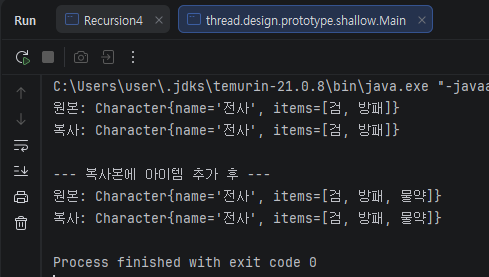
문제: 복사본을 수정했는데 원본도 변경된다! 이유는 List를 공유하고 있기 때문이다.
깊은 복사 (Deep Copy)
public class Character implements Cloneable {
    private String name;
    private List<String> items;

    public Character(String name, List<String> items) {
        this.name = name;
        this.items = items;
    }

    @Override
    public Character clone() {
        try {
            Character cloned = (Character) super.clone();
            // List를 새로 생성해서 복사 (깊은 복사)
            cloned.items = new ArrayList<>(this.items);
            return cloned;
        } catch (CloneNotSupportedException e) {
            throw new RuntimeException(e);
        }
    }

    public void addItem(String item) {
        items.add(item);
    }

    @Override
    public String toString() {
        return "Character{name='" + name + "', items=" + items + '}';
    }
}

// 사용
public class Main {
    public static void main(String[] args) {
        List<String> items = new ArrayList<>();
        items.add("검");
        items.add("방패");

        Character original = new Character("전사", items);
        Character copy = original.clone();

        System.out.println("원본: " + original);
        System.out.println("복사: " + copy);

        // 복사본의 아이템 추가
        copy.addItem("물약");

        System.out.println("\n--- 복사본에 아이템 추가 후 ---");
        System.out.println("원본: " + original);  // 원본은 그대로!
        System.out.println("복사: " + copy);
    }
}
해결: 이제 원본과 복사본이 독립적이다!
실전 예제: 문서 템플릿
더 실무적인 예시를 보자.
public class Document implements Cloneable {
    private String title;
    private String content;
    private String author;
    private List<String> tags;
    private Map<String, String> metadata;

    public Document(String title, String author) {
        this.title = title;
        this.author = author;
        this.tags = new ArrayList<>();
        this.metadata = new HashMap<>();

        // 복잡한 초기 설정
        System.out.println("문서 생성 중... (초기화 작업)");
        this.metadata.put("created", "2024-01-15");
        this.metadata.put("version", "1.0");
        this.metadata.put("format", "PDF");
    }

    @Override
    public Document clone() {
        try {
            Document cloned = (Document) super.clone();
            // 깊은 복사
            cloned.tags = new ArrayList<>(this.tags);
            cloned.metadata = new HashMap<>(this.metadata);
            return cloned;
        } catch (CloneNotSupportedException e) {
            throw new RuntimeException(e);
        }
    }

    public void setTitle(String title) {
        this.title = title;
    }

    public void setContent(String content) {
        this.content = content;
    }

    public void addTag(String tag) {
        this.tags.add(tag);
    }

    @Override
    public String toString() {
        return "Document{" +
                "title='" + title + '\'' +
                ", content='" + content + '\'' +
                ", author='" + author + '\'' +
                ", tags=" + tags +
                ", metadata=" + metadata +
                '}';
    }
}

// 사용
public class Main {
    public static void main(String[] args) {
        // 보고서 템플릿 생성 (복잡한 초기화)
        Document template = new Document("월간 보고서 템플릿", "관리자");
        template.addTag("보고서");
        template.addTag("월간");

        System.out.println("\n--- 템플릿으로 문서 생성 ---\n");

        // 템플릿 복사로 빠르게 문서 생성
        Document january = template.clone();
        january.setTitle("1월 보고서");
        january.setContent("1월 실적 내용...");

        Document february = template.clone();
        february.setTitle("2월 보고서");
        february.setContent("2월 실적 내용...");

        System.out.println(january);
        System.out.println(february);
    }
}
프로토타입 레지스트리 패턴
여러 종류의 프로토타입을 관리하는 패턴이다.
// 프로토타입 관리자
public class MonsterRegistry {
    private Map<String, Monster> prototypes = new HashMap<>();

    // 프로토타입 등록
    public void registerMonster(String key, Monster monster) {
        prototypes.put(key, monster);
    }

    // 프로토타입으로부터 복제
    public Monster createMonster(String key) {
        Monster prototype = prototypes.get(key);
        if (prototype == null) {
            throw new IllegalArgumentException("존재하지 않는 몬스터: " + key);
        }
        return prototype.clone();
    }
}

// 사용
public class Main {
    public static void main(String[] args) {
        MonsterRegistry registry = new MonsterRegistry();

        // 프로토타입 등록
        registry.registerMonster("슬라임", new Monster("슬라임", 100, 10, 5));
        registry.registerMonster("고블린", new Monster("고블린", 200, 30, 15));
        registry.registerMonster("드래곤", new Monster("드래곤", 1000, 200, 100));

        // 등록된 프로토타입으로 몬스터 생성
        Monster slime1 = registry.createMonster("슬라임");
        Monster slime2 = registry.createMonster("슬라임");
        Monster dragon = registry.createMonster("드래곤");

        slime1.setName("슬라임A");
        slime2.setName("슬라임B");
        dragon.setName("레드드래곤");

        System.out.println(slime1);
        System.out.println(slime2);
        System.out.println(dragon);
    }
}
프로토타입 패턴의 장점
- 성능 향상: 복잡한 객체 생성 시간을 단축한다
- 객체 생성 단순화: 복잡한 설정을 반복하지 않아도 된다
- 동적 추가/삭제: 런타임에 프로토타입을 추가하거나 제거할 수 있다
- 설정 보존: 복잡한 초기 설정을 재사용할 수 있다
프로토타입 패턴의 단점
- 복제 구현 복잡도: 깊은 복사가 필요한 경우 구현이 복잡하다
- 순환 참조 문제: 객체가 서로를 참조하면 복제가 어렵다
- Cloneable 인터페이스 한계: Java의 clone()은 문제가 많다고 알려짐
실무에서 언제 사용할까?
사용하면 좋은 경우:
- 객체 생성 비용이 클 때 (DB 조회, 파일 읽기 등)
- 비슷한 객체를 많이 만들어야 할 때
- 런타임에 객체 종류가 결정될 때
- 템플릿이나 프리셋이 필요할 때
사용하지 않아도 되는 경우:
- 객체 생성이 간단할 때
- 복제할 객체가 거의 없을 때
- 깊은 복사가 매우 복잡할 때
핵심 원칙:
"비슷한 객체를 많이 만들어야 한다면 프로토타입 패턴을 고려하라"
생성자 vs 프로토타입 비교
// 생성자 방식 - 매번 처음부터 생성
Monster monster1 = new Monster("슬라임", 100, 10, 5);
Monster monster2 = new Monster("슬라임", 100, 10, 5);
Monster monster3 = new Monster("슬라임", 100, 10, 5);

// 프로토타입 방식 - 원본 복제
Monster prototype = new Monster("슬라임", 100, 10, 5);
Monster monster1 = prototype.clone();
Monster monster2 = prototype.clone();
Monster monster3 = prototype.clone();
결론
프로토타입 패턴은 기존 객체를 복제하여 효율적으로 새 객체를 만드는 패턴이다.
기억해야 할 포인트:
- 객체를 복사해서 만든다 (처음부터 만들지 않음)
- 얕은 복사와 깊은 복사를 구분한다
- 복잡한 객체 생성 시 성능을 개선한다
- 프로토타입 레지스트리로 여러 프로토타입을 관리할 수 있다
- 비슷한 객체를 많이 만들 때 유용하다
다음 글에서는 구조 패턴으로 넘어가서, 서로 다른 인터페이스를 연결하는 어댑터 패턴을 알아볼 것이다.
다음 글 예고: 어댑터 패턴 - 호환되지 않는 인터페이스를 연결하라
'디자인 패턴' 카테고리의 다른 글
| 데코레이터 패턴(Decorator Pattern) (0) | 2026.01.13 |
|---|---|
| 어댑터 패턴(Adapter Pattern) (0) | 2026.01.13 |
| 빌더 패턴(Builder Pattern) (0) | 2026.01.13 |
| 추상 팩토리 패턴(Abstract Factory Pattern) (0) | 2026.01.13 |
| 팩토리 메서드 패턴(Factory Method Pattern) (0) | 2026.01.13 |


